This post is going to cover two topics. The first will be what social media “cards” are, and WHY they suck, followed in second by how StreemTech is now able to use them anyway even tho that is such a pain. (And as a bonus, I’m going to throw in my suggestion to resolve this mess with a single addition to a spec.)
What Is A Card?
Might as well begin with describing what I mean by “Cards” huh. Cards, sometimes referred to “embeds” are those rectangular bits that sometimes show up when you post a link on platforms like X (Twitter), Discord, Mastodon, Bluesky, etc. (basically any social media). They often include an image, a quick title summary, some details, and maybe even have an embedded video.

They are enriching the experience of using any given platform, and are thus also sometimes referred to as rich content.
Cards have, in fact, become so ubiquitous across the internet that several entire sites have sprung up with the singular purpose of “fixing” links posted of different services to provide more (or just different) information in the generated card.
An example of this is vxbsky.app, who’s host-name is so similar to that of its target site, bsky.app, that it can be used by simply adding the vx at the beginning of the url (quite smart marketing & design all wrapped into one). When you replace the default Blue Sky url with that of the vx site, and send it as a link in discord, the information displayed will differ.
The vxbsky.app shows the like and re-post counts in the header of the card,

whereas the bsky.app one will instead have the poster’s profile picture in the top left corner, a basic like count, add a site logo and post date in the footer, and set up the @’s and the hashtags to actually link to the associated user or hashtag search.

The commonality between all of these examples however, is that the links will result in the displaying of content relevant to the page being linked to.
How Cards Work
Now, the question is, how do these cards get their data? The answer, rather plainly, is that those services load up the webpage. The thing is, each web page is different, and even a random user loading up a given webpage might not be able to reasonably select what information to put in the card, let alone a computer program. Obviously then, the program generating these cards looks at something other than the information on the page that is displayed to the user.
It looks at the meta tags located in the html’s header section. These tags are powerful tools that allow the creator of a website to embed certain extra information for programs to parse, including the browser of the individual looking at the page.
For example, should you inspect (F12, or right-click -> inspect) the page you are reading these on, you could open up the head tag of the html and see these three tags up towards the top.
<meta charset="UTF-8">
<meta name="viewport" content="width=device-width, initial-scale=1">
<meta name="robots" content="max-image-preview:large">These tags tell the browser what character set to use when rendering, how to render the page visually, and tell any bot looking at the page how it should attempt to render the page. They do this by setting the name and content attributes on the tag to given, standardized values, allowing any tools to parse the data out.
Further down you can see more meta tags, and these tags are the ones that we are most interested in for creating the cards.
<meta property="og:url" content="https://blog.streem.tech/">Unlike the above tags, which either used attribute-value paris, or used name-content, the information used to generate cards uses property-content pairs. In this case, the og:url property is being set to `https://blog.streem.tech/.`
Now, the question becomes where the values for properties and content come from. That is, how the creator of a site, or of a program parsing sites for this information, know what information to look for, and what means what. In general, there are two groups of properties. Those of the `twitter:card` family (twitter having been largely responsible for popularizing the card) and the `og:card` family, AKA OpenGraph (created by facebook).
Twitter:Card
The documentation for twitter:card has unfortunately been largely scrubbed from the internet when it became X and the API was reworked (tho it can be found on The WayBack Machine). Even the validator that used to be able to be used to determine if a card would render properly on the site no longer exists, instead directing the user to simply make a test tweet and see how it looks. X will however, fall back to the open graph standards if you dont use the twitter:card values, which largely means that that standard can be prioritized with little worry.
OG:Card
The specification for OpenGraph can be found at ogp.me. Here you can see the full list of properties, including a og:type property, which can then be used to determine what sub-properties a site creator might want to also include. For example, if you set og:type to book, you might then want to set book:author or book:isbn.
OpenEmbed
Tho the data is not represented in the same meta property/content paradigm as OpenGraph and TwitterCards, OpenEmbed is the last of the 3 major ways that data will be extracted from the html of a webpage by a bot. Unlike the previous two however, instead of embedding the data in the site directly via meta tags, the data is returned from an extra API request made by the bot. That extra request is made to a URL that is pointed at via a `link` tag with a specific type of either text/xml+oembed or text/json+oembed.
(Example taken from the OpenEmbed site)
<link rel="alternate" type="text/json+oembed"
  href="http://flickr.com/services/oembed?url=http%3A%2F%2Fflickr.com%2Fphotos%2Fbees%2F2362225867%2F&format=xml"
title="Bacon Lollys oEmbed Profile" />The url can then return an object that has properties that can the be used to construct the cards as desired, much like the meta tags.
{
	"version": "1.0",
	"type": "photo",
	"width": 240,
	"height": 160,
	"title": "ZB8T0193",
	"url": "http://farm4.static.flickr.com/3123/2341623661_7c99f48bbf_m.jpg",
	"author_name": "Bees",
	"author_url": "http://www.flickr.com/photos/bees/",
	"provider_name": "Flickr",
	"provider_url": "http://www.flickr.com/"
}Why This Sucks For StreemTech
So far, it sounds like the ability to create cards just requires adding a bit of HTML to the web page, and for the simplest of cases, this is true. The issue arises when you want to have the cards reflect the content on the page itself.
Most of the scrapers and bots that exist to grab the card information will not run any form of code on the page, and only treat the incoming HTML as plane text to be looked through. What this means is that the meta tags must be embedded before the page is sent to the browser. For some sites, the html is generated by a server and then forwarded on to the user, or is a static file to begin with. Just scanning the HTML works fine for those situations. For StreemTech however, this is problematic. StreemTech uses Angular, and is what is known as a “single page application” (SPA).

SPAs, unsurprisingly, act mostly as single page, not reloading every time the user clicks on a link. For a normal websites, every time the user clicks on a link to go to a new page on the website, the entire page is fetched again from the sending website. Single page applications instead intercept that click, and, instead of going to get an entire new page, change the layout of the page to that of the desired page. This allows the site to be quickly navigated through as the user (theoretically) does not need to ever wait for the page to be loaded from the server.
Because of the nature of SPAs, they require a large amount of code to run and create the page. With this code not being run by the scraping bot, only the meta tags that exist at the start of the page loading will be registered. this is the crux of the problem.
Server Side Rendering
There are several options to solve this problem that can be selected from. The first is to just abandon the idea of having dynamic meta tags, and embed the meta tags with the initially loaded page. This is actually what I selected for quite some time for StreemTech, choosing to have the card generated from any given link result in the same card.
This is not ideal however, as cards offer a great way to attract individuals to the site, not only as the site owner, but also as a user using the site as a platform.
The only viable solution then, will be to some how have the tags that I wish parsed be added to the page before it is sent to the user. While difficult, this is possible.
The solution to this is to take the page out of the book of one of the processes mentioned above, and to have some server program actually create the web page to send. (As an aside requirement: the returned page would need to be seamless, and able to be used by any user, not just a bot scraping the site, after it is initially loaded.)
This process is known as Server Side Rendering, as the server, on request, is creating (rendering) the content of the page and sending that content to the user. This includes, importantly, embedding any desired meta tags. If done smart enough, the browser can even then take the page, and pick up from where the server left off at with any processing.
This process is so common even, that many sites will have server-side rendering for not just scraping bots, but for every single user’s first request to the site.
Getting SSR Working For StreemTech
The question then, is how did we add server side rendering to StreemTech?
Thankfully, most of the work has been done already, as the team behind angular is incredible, and has built server-side rendering into the application itself. It takes some configuration, but largely, “It Just Works”. Unfortunately, for me and StreemTech, the “Just Works” didn’t.
StreemTech has become such a complicated site, that many of the back-end steps that build up the stuff for server-side rendering ran into problems during generation. I was, however, able to break down the StreemTech code to its bare-bones, and slowly add bits and fix problems they created. This process of slow addition and bifurcation when a problem was encountered, was performed across the entire site’s code-base. In the end, all but a few very minor things were able to be migrated over to appropriately server side render.
I knew this was possible and put the work in because I had StreemTech working as server-side rendering the past using the old method called Angular Universal, but had to disable it due to problems within Universal. Having that code to reference really helped.
Once I was able to get everything up and working generating server-side, I built the site into a docker container so that it could be hosted in my Kubernetes cluster, which gains it the benefits of scale and uptime provided by Kubernetes.
As a side benefit to being hosted on my Kubernetes cluster with the API containers, I was able to change the API endpoint that are queried to the local ones used internally, drastically lowering the latency of the page construction.
Forwarding For Bots
The last step then, is to set things up so that the traffic will be appropriately forwarded for bots as (currently) I don’t trust the SSR containers to not overload my servers locally when they all load up at once. The way I was going to do this was via the same method that I used to host the application to begin with. Cloudflare workers.
Specifically, any request that goes into Cloudflare gets processed, and the appropriate resource (the index page, unless its an explicit asset) returned. The benefit of having everything on a worker is that you can return an appropriate response based on other conditions as well (for example, I have certain debug options I can change remotely without redeploying completely).
In the case of StreemTech, I used a publicly available isBot package to detect “good bots” that intentionally declare themselves, and forward those requests to the SSR container. Any other traffic is processed directly like all traffic previously.
The other thing I added in this process was debug options to direct all requests to the SSR containers, as well as options to have the bots bypass the SSR checks. A great set of updates for the worker making the SSR both robust, testable at scale, and by-passable as necessary (As it happens, The site is now more robust in general, as I now direct traffic to the SSR containers if necessary, such as If I (or Cloudflare) breaks the client side rendering)
How This Situation Can Be Improved
That said, this is a lot of work to add only a few bits to the card for StreemTech (tho hopefully more in the future). In my opinion, this was too much work. I think the standards that exist still don’t properly address single page applications, and so I want to suggest an alternative.
Specifically, I believe that OpenEmbed could be easily adopted to allow for single page applications to thrive with their meta information. What could be done (and I have suggested this on the spec, but the spec is likely calcified, so who knows if it will become standard) is to add a single attribute to the link tag that has the OpenEmbed link. This attribute will tell the scanning bot to include the URL being requested at the query parameter specified in the attribute. In this manner, a static link tag could be included in the page. The only work that would ever have to be done in that case would be on a back-end server that should be much easier to control. (or would already be doing what its doing for OpenEmbed.) A win all around.
Errata
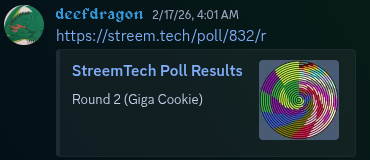
As a final note, have a look at what the embed for a StreemTech poll looks like. I’m currently working on updating the meta tags for other parts of the site, but hopefully soon, Gachalerts will have meta tags for both characters and universes to appropriately embed.